
What this page is about
Saildocs is the first GRIB service developed for sailors. It was designed to meet the needs of those with restricted bandwidth whether that is for emails over HF/SSB radio, satellite phones or in areas of poor connection to the internet. It is a little clumsy in use but is the most flexible of all GRIB services and the most economical.
Although funded and developed by SailMail for its members, SailMail has made the service freely available to all.
On other pages
About Saildocs
Initially, Saildocs was developed to obtain GRIB from the US NOAA/NCEP GFS (Global Forecast System) model. File size depends upon the amount of data requested and can be from a few tens of kb upwards.
Saildocs was developed for users of Airmail over the radio amateur service Winlink or the SailMail system of user funded marine HF network. SailMail ia a certified application For Iridium GO!
For advice on using HF/SSB radio for email, see page produced by Richard Clifford for members of the RCC. for information on the use of Airmail by HF radio..
Also, see the Notes on receiving SailDocs over HF provided by Allan Riches of Brunei Bay Radio. Another useful resource is Sarana, Eric Sherwell’s notes on obtaining Saildocs GRIB and other data. A note concerning the output issued by Saildocs is on another page..
Requesting a GRIB file
The procedure described using Saildocs may seem somewhat cumbersome but is extremely flexible. The easiest way to show is by example.
To request a GRIB file send an email to query@saildocs.com, Type anything you wish as subject - but do not leave it blank.Formatting has to be precise but messages are NOT case
send gfs:40N,60N,0W,20W/0.5,0.5/0,24,48,72/
That will result in an email with a GRIb file attached that Wnd and Pressure values for the area selected, on a 0.5 degree latitude/longitude grid at 0, 24, 48 and 72 hours ahead.
NOTES. GFS grid spacing can be multiples of 0.25 degree. Times can be at intervals of 3 hours or multiples of 3 hours. Wind and Pressure are the default elements. Other elements can be selected individually or in groups by adding IMMEDIATELY after the separator / or | and separated by commas with NO spaces.
Elements that can be requested vary wiyj yje model and are on the page.
send gfs:40N,60N,0W,20W/0.5,0.5/0,24,48,72/Wind, PRESS, APCP
would be a request for wind, pressure and rain.
To avoid lon strings of time requests, the following convention should be used.
send gfs:40N,60N,0W,20W/0.5,0.5/0,3..72/ .
request a forecast every 3 hours from T=0 to T=72 hours.
send gfs:40N,60N,0W,20W/0.5,0.5/0,3..36,48..192/
for a forecasts every 3 hours from T=0 to T=36 and every 12 hours from T=36 tp T=192 hours.
Repeat Requests and Cancellations
For a daily repeat, use the same format but change the "send" to "sub". For example:
sub gfs:40N,60N,0W,20W/1,1/0,12..120
will result in a forecast received daily, shortly after 0615 UTC.
By default you will receive this information daily for 14 days. To change this add a space and days=5 for a 5-day subscription, or days=0 for an indefinite subscription. Examples for a wind only request -
sub gfs:40N,60N,0W,20W/1,1/0,12..120/wind DAYS=5
or
sub gfs:40N,60N,0W,20W/1,1/0,12..120/wind DAYS=0
Cancellation
Each GRIB message includes instructions on how to cancel.
Viewing
Having received the email reply, save the attachment to a folder. Some Viewers are listed on another page of this site. The ratheSaildocs Viewfax and XyGrib presentations look like this:-
NOTE. One short feather = 5 knots, one long feather = 10 knots. The arrows "fly" with the wind.'''
Viewfax 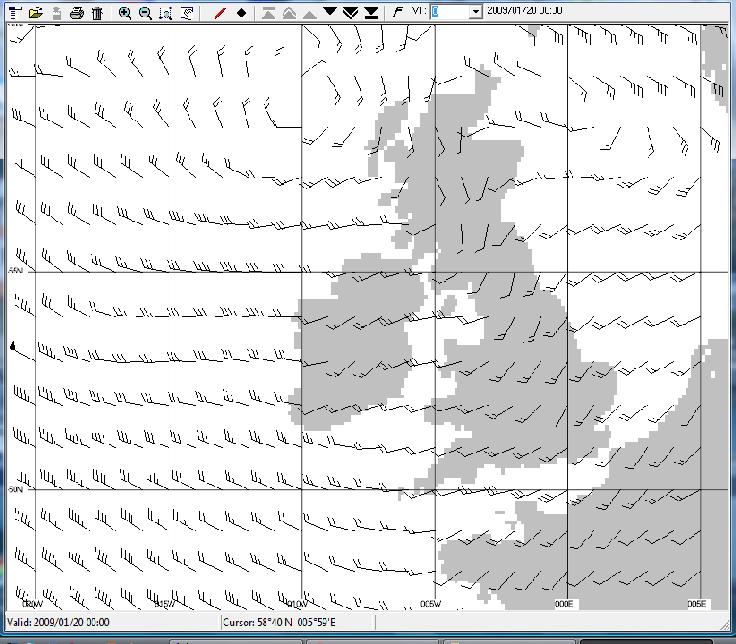 |
XyGrib 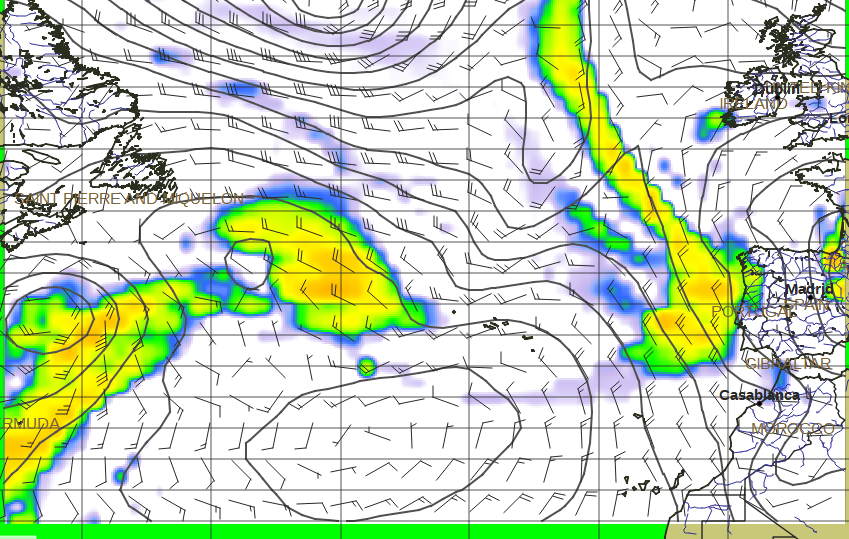 |